


Harnessing AI in Landscape Design: Opportunities and Challenges for Modern Practitioners

Artificial intelligence is reshaping many industries, and landscape design is no exception. Over the past year, I have tested various free versions of AI tools to see how they perform in real-world landscape business and design tasks. The results reveal both possibilities and limitations. This post shares my hands-on experiments, highlighting how AI can support landscape designers and where it falls short.

Using AI for Website Troubleshooting
My first test was straightforward: I asked ChatGPT to help fix a Google Search Console error on my website. The error message was “Alternate page with proper canonical tag.” ChatGPT guided me through the steps to check the issue and correctly concluded that no action was needed. This quick and accurate response saved me time and confirmed that AI can assist with technical website problems for those businesses that do not have a webmaster or SEO assistant.
Key takeaway: AI can provide useful, accurate advice for technical tasks outside of design, such as website diagnostics.
Calculating Irrigation Runtime with AI
Water management is critical in landscape design, especially in drought-prone areas like California. I asked ChatGPT to calculate the weekly irrigation runtime for a cool-season fescue lawn using Hunter MP Rotators in Sunnyvale, CA, during August. ChatGPT estimated 5 hours per week based on a weekly evapotranspiration (ETo) rate of 1.75 inches.
However, when I checked WaterWonk, a trusted irrigation calculator, the actual ETo was 1.47 inches. When I asked ChatGPT for its data sources, it gave inconsistent answers, mentioning Bay Area averages, Union City data, and monthly number conversions. This inconsistency shows that AI-generated calculations require verification with reliable local data.
What this means: AI can provide rough estimates for irrigation but should not replace precise, location-specific calculations. Always cross-check AI outputs with trusted tools.
AI for Garden Design Mockups
Next, I tested AI’s ability to create garden design mockups. I uploaded a client’s patio photo and asked ChatGPT to add trees and large shrubs for shade suitable for Zone 9b in SF Bay Area. The AI suggested appropriate species such as Arbutus ‘Marina’, Cercis occidentalis, and Toyon, which are well-suited for the climate and provide good shade.
When I asked ChatGPT to add these trees to my photo, it created a decent mockup of the photo with new trees. Then, when I asked the AI to highlight the new trees with circles over them, it redrew the entire garden instead of focusing on the additions. After several attempts, I found the AI lacked consistency in iterative design changes. This shows that while AI can generate useful plant suggestions and initial concepts, it struggles with precise, incremental edits.


As another experiment, I asked both ChatGPT and Gemini nano-banana to design a fire-safe pergola with metal or stone-clad posts and vines with a wire top. ChatGPT offered ideas and generated a sketch; Gemini provided a blog post link and then "got lost" (froze) when asked for an image. Here is a reasonable looking pergola idea from ChatGPT, but of course that vine will need a planting bed to grow out of!:
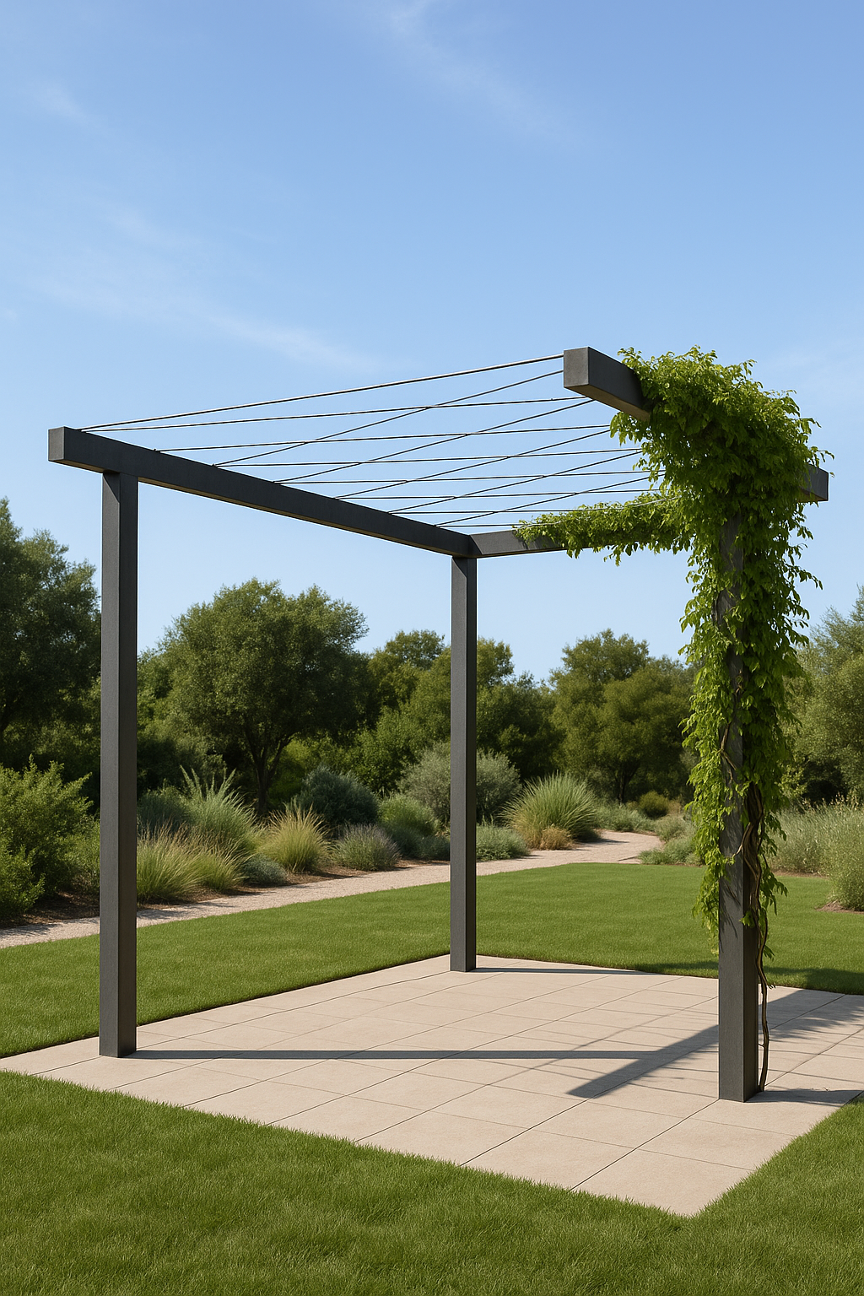
Insight: Use AI for inspiration and initial ideas, but expect to do detailed design work manually or with specialized software.
AI for Kitchen Design Mockups
For the next experiment, I thought I would try an interior design approach instead, so I loaded in a kitchen photo to see how I could remodel the materials. I tried ChatGPT and Google Gemini (free and Pro tiers). Each had strengths and weaknesses.

Here are the changes I wanted: Maple floor and upper cabinets, walnut lower cabinets, countertops in Taj Mahal quartzite (island) and brown granite (elsewhere), and backsplash in glass pencil tile.
Neither ChatGPT or Gemini free tier got the maple and walnut cabinet combo I wanted. However, I was able to get Gemini to simulate the upper cabinets in white:

I was able to get ChatGPT to make all but the island cabinets maple:

Finally, I decided to try the paid PRO version of Gemini and I got better but quite different results.

I prefered the free version of Gemini in the flooring maple choice and the island countertop as Taj Mahal as much more realistic than the PRO version. However, I was never able to get the free version to correctly model the cabinets.
My takeaway: In my experience with iterative photo editing, all of these tools came close, but despite many attempts, none of them were able to render all the changes as I wanted them.
Creating Visual Content with Canva Magic Media Tool
For the next experiment, I used Canva Magic Media 3D tool to create a poster for a conference in landscape design. My goal was to create visually appealing results to help communicate garden design principles effectively. The tool was useful in quickly generating promotional materials without needing advanced graphic design skills. However the hardscape it created was a bit paradoxical, with steps and paths going nowhere!

The Canva tool wasn't able to iteratively correct mistakes; instead it would generate a completely different image with its own problems. This was the best of the lot; I was able to make use of this image by covering up some of the oddities with titles and other graphical elements.
My Takeaway: AI-powered design tools like Canva can support professionals by quickly creating marketing visuals without privacy or IP issues, but you will need to work around some mistakes.
Balancing AI’s Promise and Pitfalls in Landscape Design
AI enhances landscape design with:
Time savings on technical tasks and marketing
Idea generation for plant selection and layouts
Support for marketing and client communication
However, AI has limitations:
Data accuracy requires human verification
Inconsistent design iterations hinder detailed editing
Lack of contextual understanding limits expert judgment replacement
Landscape designers should view AI as a supportive tool, not a replacement. With ongoing advancements, better results and guidance are expected in the near future.
NOTE: For data security reasons, it is advisable not to share any personal or client information with these tools.
*This article has been "enhanced" by AI for spelling, grammar, and length.


Comments